Built for the work you run.
Match compute, memory, storage, and connectivity to your applications. Work with Contour to plan capacity and adjust your environment as requirements change.

AI-powered Cloud, built around your business. As a certified Cloud Services Provider, Contour combines infrastructure, AI-powered server provisioning, intelligent monitoring, and hands-on expertise—with visibility and self-service control through Cinch.
Performance for your workloads. Economics that fit your plan. Simplicity through Cinch. Bring infrastructure, protection, and recovery together with a team that helps you put them to work.
Visibility · Self-service · Orchestration
Choose self-service, co-managed, or Contour-managed services.
Match compute, memory, storage, and connectivity to your applications. Work with Contour to plan capacity and adjust your environment as requirements change.
Choose infrastructure and service levels around your needs. Align capacity, management, and data protection with your budget and growth plans.
No Egress Fees!Move your data out of Contour Cloud without egress fees.
Use Cinch for workload visibility and the self-service tools available to your team. Connect cloud operations with support and service information.
Bring cloud, protection, and recovery into one working relationship. Choose your management approach and plan how critical applications return to operation.
Contour’s marketplace supports third-party software and solutions alongside your cloud infrastructure. Bring licensing, management, security, data protection, and recovery into a service plan that fits your environment.

License supported Microsoft software through the Services Provider License Agreement (SPLA) program.

Support day-to-day operations with monitoring and management technologies.

Include endpoint protection in the security services designed for your environment.

Connect backup and restore capabilities with your workload protection strategy.

Support workload replication and planned recovery workflows.

Add Cisco technologies to the networking and infrastructure solutions that fit your business.
These are examples of the technologies supported by Contour’s marketplace. Product availability, licensing, integration, and service scope are defined for your environment.
Talk to an Expert Schedule a meeting →AI-powered provisioning reduces repetitive setup work, while intelligent monitoring helps your team understand workload health and resource needs. Build on Contour compute, storage, and networking, with self-service, co-managed, or managed support to fit your business.
Move your data out of Contour Cloud without egress fees.
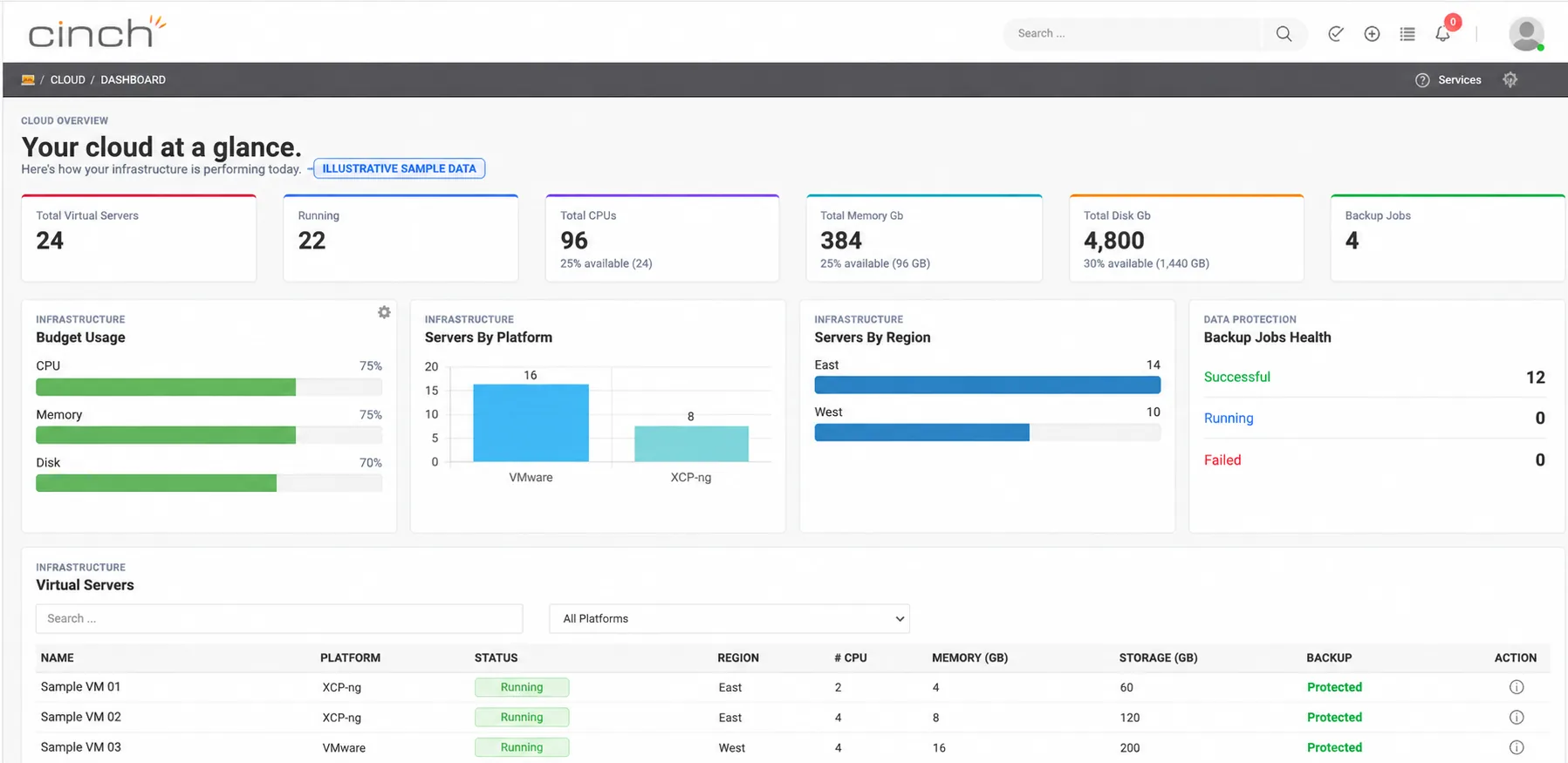 Illustrative sample · View larger ↗
Cinch visibility and self-service tools depend on your services and permissions.
Explore Cinch Cloud Management →Design compute, memory, and storage around application needs and expected growth.
Plan Internet, VPN, and private connectivity to support users and application dependencies.
Add licensing, data protection, monitoring, and managed services as your needs evolve.
Build your cloud environment around your applications: their capacity, connectivity, access requirements, and dependencies.
Ownership and management responsibilities agreed with your team
Server infrastructure sized for the compute capacity your applications need.
Virtualization platforms to host selected workloads in your Contour Cloud environment.
Data center networking connects compute, storage, and the services your applications rely on.
Replication and recovery workflows for supported workloads, with recovery points and procedures defined in your plan.
Storage options sized for application data, protection, and operating requirements, with capacity and performance defined for your workloads.
Define segmentation, approved access, and connectivity for users and application dependencies.
Your solution design defines platform compatibility, licensing, capacity, and service responsibilities for the selected workloads.
View cloud resources, inspect workloads, and access self-service orchestration through Cinch. Explore this sample dashboard to see how infrastructure visibility supports everyday operations and capacity planning.
Illustrative environment · Example data
| Name | Platform | Status | Region | vCPU | Memory | Storage | Protection | Details |
|---|
Cinch brings infrastructure visibility and self-service orchestration into one cloud management experience. Available actions depend on your permissions and service configuration.
Scroll through sample Cinch views, or select an image to take a closer look.
Review CPU, memory, disk activity, and network traffic for a workload.
Review workload network interfaces, connectivity, and connection status in Cinch.
See support tickets, their status, and the requests being handled.
See the services, scope, and management responsibilities across your environment.
Anonymized illustrative previews. No customer names, real server identifiers, or IP addresses are shown. Available views and actions depend on your services and permissions.
Review workloads across platforms and regions, with CPU, memory, storage, and status in view.
See allocated resources and capacity information to inform operating and capacity plans.
Access cloud IaaS and self-service orchestration, with available functions determined by your service and role.
Keep recovery copies in Contour Cloud with schedules, retention, and restore requirements designed around your business. Protect selected physical and virtual workloads with the level of management your team needs.

Technology selection and recovery workflows are designed around your workloads and service requirements.
Establish a secure connection between your environment and Contour Cloud.
Configure supported protection software and identify the workloads and application data to protect.
Agree on schedules, retention, monitoring, and the process for testing restores.
Rubrik or Veeam may support backup and recovery workflows. The final design depends on workload compatibility and your service scope.
A deleted file, an unwanted change, or an unavailable system calls for a different recovery approach. Contour helps you plan which copies to retain, what to restore, and how to validate the result.
A restore point represents a captured state of protected data. Review available dates and times to identify a copy from before a deletion, corruption, or unwanted change. Available history depends on your protection schedule and retention policy.
Plan for individual files, supported application data, or complete workloads. The recovery method depends on your platform and the data being restored. Validate the selected copy and restored application before returning it to use.
Set retention periods around operational needs and records requirements. Discuss longer-term archives, storage tiers, and lifecycle policies. Immutable or write-once retention can be included where supported and configured for your service.
Plan storage capacity and file, block, or object storage options for your protection design. Use the Cinch views available to your team to review protection information and restore points, with authorized self-service or Contour-assisted recovery.
Select an example workload to explore its retained recovery points.
Selected example: Oct 7, 2026 · 5:00 AM
Identify the appropriate point, confirm the restore scope, and validate the recovered data or workload.
Bring your backup data back from Contour Cloud without egress fees—so data transfer costs don’t stand in the way of your restore plan.
Agree on recovery priorities, test restores, and document who makes the decisions when data needs to come back.
Replicate selected workloads into Contour Cloud and define how applications return to operation when your primary environment is unavailable. Build recovery around application dependencies, business priorities, and agreed recovery objectives.
Technology selection and recovery workflows are designed around your workloads and service requirements.
RECOVERY VISIBILITY| Application group | Recovery site | Protection |
|---|---|---|
| Sample application 01Business systems | Contour Cloud | Protected |
| Sample application 02Data services | Contour Cloud | Protected |
| Sample application 03Employee services | Contour Cloud | Protected |
See application groups, replication status, and recovery destinations together.
Review available journal history for your selected application group.
Track recovery readiness, test activity, and available recovery points.
Cinch connects your team to configured recovery tools. Available controls, journal retention, and recovery objectives depend on the selected technology and service design.
Protect a recovery copy. Restore critical applications. Run them in Contour Cloud. Air-Gapped Tertiary Site Recovery combines an isolated vault with enterprise IaaS, giving your business an alternate place to operate while your primary environment recovers.
Contour Secure Cloud: Air-Gapped Tertiary Site Recovery
Technology selection and recovery workflows are designed around your workloads and service requirements.

See how an isolated recovery copy and alternate cloud infrastructure support your recovery plan.
Deliver hosted desktops and applications with access and support designed for your workforce, across devices and locations.
Plan access to desktops, applications, and company resources for your users.
Discuss monitoring, patching, endpoint protection, and Microsoft 365 management within your service scope.
Connect your workforce with Contour’s help desk and technical support services.
Protect your cloud environment with security built around your workloads. Contour deploys AI-assisted security technologies alongside EDR, XDR, and MDR capabilities, supported by enterprise-grade Security Operations Center (SOC) and Security Information and Event Management (SIEM) capabilities.
Monitor supported endpoints for suspicious activity, investigate alerts, and support containment and remediation through the controls configured for your environment.
Bring security signals from supported sources together to reveal patterns across your environment. AI-assisted analysis helps prioritize activity that needs investigation.
Combine detection technologies with managed investigation and guided response. Experienced security professionals help assess threats and coordinate the next steps.
AI-assisted SIEM analytics connect security activity across supported systems and prioritize potential threats. Experienced SOC analysts investigate the evidence and guide authorized response.
24/7/365 monitoring. AI-assisted analysis. Experienced people ready to act. Coverage and response responsibilities are defined in your service plan.
Correlate supported endpoint, identity, network, and cloud logs to reveal suspicious patterns.
Use AI-assisted analysis to reduce alert noise and prioritize investigation.
Give SOC analysts relevant evidence and context to assess potential threats.
Support approved containment and remediation, with people overseeing critical decisions.
Role-based access, multifactor authentication, and approved privileges.
Segmentation, firewall controls, and private connectivity options.
Encryption and recovery controls selected for your workloads.
Connected logs, alerting, and reporting to support investigation.
Security coverage, integrations, monitoring hours, and response actions are defined for your selected services. Protection and recovery planning work together.
Explore Contour’s managed security services →Talk with our team about the location and cloud services that fit your environment.
Bring your workloads, priorities, and questions. Talk with Contour about the infrastructure, protection, and recovery your business needs.